Showing posts with label Blog Tips. Show all posts

Increase Blog Traffic

HitLeap Exchange is a powerful site to increase Traffic blog , website , or can also promote your referral link in the online business , you can even get a dollar from this HitLeap .

HitLeap minutes using the system as a minute to calculate its traffic .
If we register at hitLeap , we will become a regular member . 3 regular members can enter the website address that can be used in the traffic exchange .

Once you register , you will get a 50 % ratio . If you want to maximize traffic exchange , you use Mozilla's Firefox browser and download the Add -On for Mozilla firefoxnya are already available on the Web HitLeap .

Description :
If my friend install Hitleap Viewer , you will get 20 % Ratio
If my friend Hitleap Upgrade , you will get 30 % Ratio

Here is How to Get Traffic it:
Visit http://hitleap.com
The contents of e - mail , Username , and Password and click Sign Up
Sign In to E - mail , then click on Click Here to E - mail sent HitLeap
It will appear the following posts :
Please Log In
Click the My Websites
Click on Submit Website into the Traffic Exchange
Fill in the form provided and click the Submit for review

Click the Traffic Exchange
Click on the Start Traffic Exchange
Every minute you use to browse this site , will add to the All - Time Minutes Earned which will be exchanged with a visit to your site

nb : Our blog will be displayed according to the amount of time that we get when running autosurf .


Please pal download Hitleap Viewer software . Hitleap Viewer is Hitleap supporting software that serves to facilitate our use hitleap .


                                                         DOWLOAD HITLEAP VIEWER


So first I share tips to increase your blog traffic , get tips as well - the other odd tips which is very effective to increase your Blog Traffic only HERE .
How to Apply and Install Widget Histats in Blog

Register and Installing Widgets Histats in Blog

I've been wanting to make a post about getting the data and the widgets from histats visitors to the Blog. But only now can terlakasana and I will discuss in the article Histats Up and Installing Widgets in Blog . Histats well used to monitor visitors to your blog to help you know the progress on your blog , or to show off to the crowds for a public blog buddy , hehe .
This will provide data Histats Traffik visitors in detail include : the number of online visitors to your blog , aired today , today's visitors , total visits , total views , city / state visitors are coming from and others.

How ? interested in getting the data from Histats ? You can register , get the info and the widget .

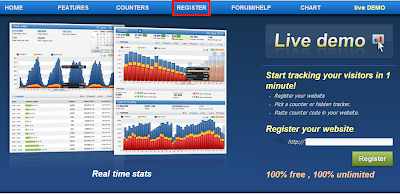
1 . Sign in to Histats page , and click register .
Cara Mendaftar dan Memasang Widget Histats di Blog


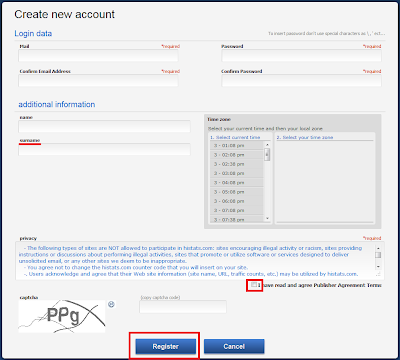
2 . Create new account on the form , fill in the data requested histats . The term surename is a family name or family name . Once charging is complete , check the box I have read and agree Publisher Agreement Terms , fill in the captcha code and click Register .

Cara Mendaftar dan Memasang Widget Histats di Blog


3 . The following text will appear asking my friend check the email address for verification .
Cara Mendaftar dan Memasang Widget Histats di Blog


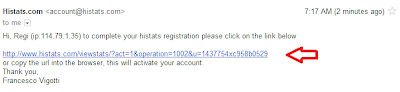
4 . Then check your email inbox on , there will be a message from histats . Click the link provided histats for verification .
Cara Mendaftar dan Memasang Widget Histats di Blog

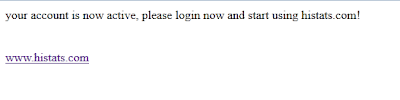
5 . The message of histats that your account has been activated , and ask you to login .
Cara Mendaftar dan Memasang Widget Histats di Blog


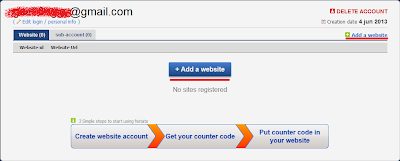
6 . Then do log in and start using Histats . If you have logged in , click Add e website .
Cara Mendaftar dan Memasang Widget Histats di Blog

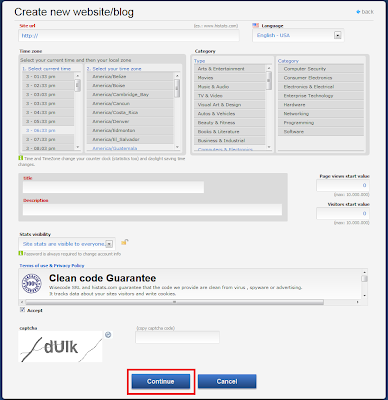
7 . In the form create new website / blog histats fill in the requested data , among which :

Site url : url Blog .
Language: the language used in the blog .
Time Zone : The time zone where you are.
Category : the category of content on the Blog.
Title : Blog Title .
Description : A brief description of the contents of your blog .
Page views start value : numbers start dihitunngnya views . If zero , then leave it blank
 Visitors start value : numbers start dihitunngnyapengunjung . If zero , then leave it blank
Stats visibility: select the first option if the data traffic is displayed to the public .
Check the box on the option Accept Terms of use & Privacy Policy .
Fill in the captcha code .

When you have finished filling out the form create new website / blog , click Continue .
Cara Mendaftar dan Memasang Widget Histats di Blog

Done , you 've created an account and register your blog histats to be panatauan visitors by histats . Please operate on its own , as I will discuss next is to get a widget from histats to be installed on the blog .

8 . Click on the name of the blog will mate pairs histats widget .
Cara Mendaftar dan Memasang Widget Histats di Blog

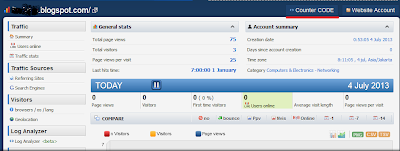
9 . This page will show details about visitor pal . Click Counter CODE .
Cara Mendaftar dan Memasang Widget Histats di Blog

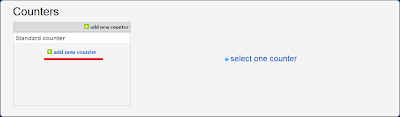
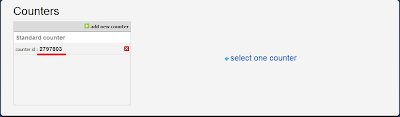
10 . Click add new counter
Cara Mendaftar dan Memasang Widget Histats di Blog

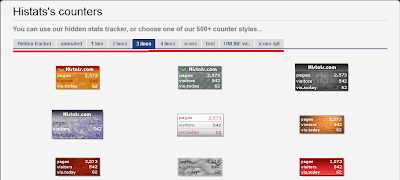
11 . There are many views , please choose which you like .
Cara Mendaftar dan Memasang Widget Histats di Blog

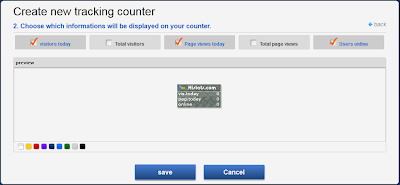
Check the data need to be displayed on the buddy buddy Blog , and click save .
Cara Mendaftar dan Memasang Widget Histats di Blog

12 . Click the newly created Counter Id .
Cara Mendaftar dan Memasang Widget Histats di Blog

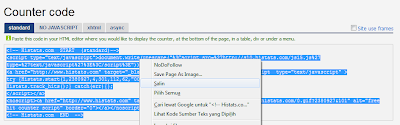
13 . You will be given a code by histats , select the standard course and a copy of the code .
Cara Mendaftar dan Memasang Widget Histats di Blog

14 . Then paste to your blog widgets . Sign Blogger >> Layout >> Add Gadget >> HTML / Javascript >> Paste >> Save

Making a cool title on the blog

Want to have text blog logo like that ?

Earning For Dollar
Display the logo on the blog header distinctive and has a good design is sure to be the desire of bloggers . Blog logo is usually displayed as part of the header is a blend of image and text images that contain the name or hallmark of a blog . Generally , blogs are used to replace the logo text to the header title and description . Of course , making the blog logo , although the logo only in the form of text , is not easy for everyone .

The good news , today there are many services onlaine sites that can facilitate the work of creating a blog logo . Anyone can easily create a text logo for blogs and blog logo header with fairly good results and did not disappoint . I have picked out 6 online logo generator / creator is easy to use as follows :

1 . www.textspace.net

Having different types of text generator in accordance with its design shape , eg patterned text generators , glitter text generator , LCD text generator , generator text marquee , and many others . Has a clean interface and fast page load time so that makes us even easier and faster to create a logo .

2 . www.flamingtext.com

Flaming text has an extensive collection manifold design with a wide selection of the simplest and most animatif . Makes you have to be more observant and really focus to make because of the many design options to choose. Interface generators complete with a live preview of the result of the edited text so no need to move the page to re-edit .

3 . cooltext.com

Similarly flamingtext , Cooltext has a large collection of design and has an interface that is easy and handy editor , so that anyone can easily use it . There are two types of design , the logo and buttons . Also equipped with dozens of attractive fonts that can be selected and adjusted with a design blog .

4 . www.simwebsol.com

When I open the web page of this website , you will go to a simple text editor logo . Overall customization text submitted to the user , so as to make the logo in accordance with the will . The choice was not his style so much , but still quite valuable given the results of an online logo image creator has pretty good quality .

5 . www.logomatik.net

Design- design on this site emphasizes the charming collection of font design . Produced by the generator design can be customized , but the colors black and white picture in my opinion is the best because of its vector impression is very powerful and riveting .

6 . www.thelogoshop.info

Quite simply , or practically very simple , but because the site has only one page , its design is very limited . However , for those of you who are learning and blogging early in the process and design drawings , this site could be a prefix for you to learn to create a logo design
After getting the blog logo , attach the logo to replace the title and description on the blog header .

Please select which of the coolest blogger pal ,
Good luck and be creative as cool as possible .
mate may be useful for bloggers

Improve the Refferal on your Online Bussines

Here's how my brother , follow these steps :

Go to site EasyHits4U
Click on Join Now at the top right corner of the first to join this site .
Fill in the registration form and then click Join EasyHits4U
After the registration verification link sent to your email .
Login to your email and click on the verification link
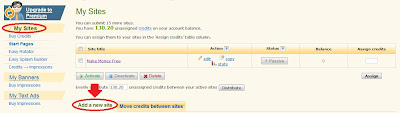
Once registered , please Sign In and then click on My Site
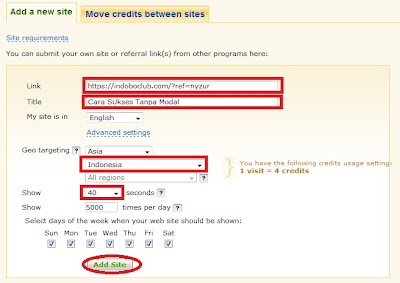
Fill in your referral link in the form Add a New Site , change the display time to 40 seconds the site , Geo targeting : Indonesia then click Add Site
Arrange as shown above
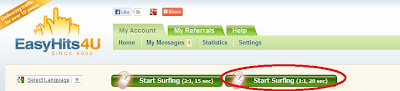
Click on Start Surfing 1 : 1
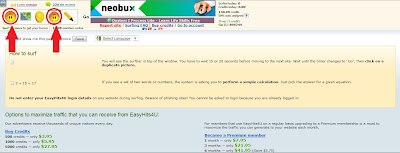
Please surf the site as much - much to get the credit that you will change with the traffic towards your referral link .
Image when surfing
After the credit collected from the surf deemed to be sufficient , please redeem the credit by a visit to your referral link by going to the My Sites menu . See the image below as an example:

After that your task is waiting for incoming referrals .

By analyzing the more links you see , the more people will be interested . Yeah like that's my tips so that gets a lot of referrals quickly , or if you do not want to just buy any complicated creditnya so gk have to waste - waste of time to surf